Article
SME Document Chaos: Project-Based Management with Alios
End version errors and file chaos! Learn how to use Alios’s Node-based structure to transform your SME's documents into a secure, organized corporate memory today.
File Chaos in SMEs: How to Establish a Project-Based Document Structure
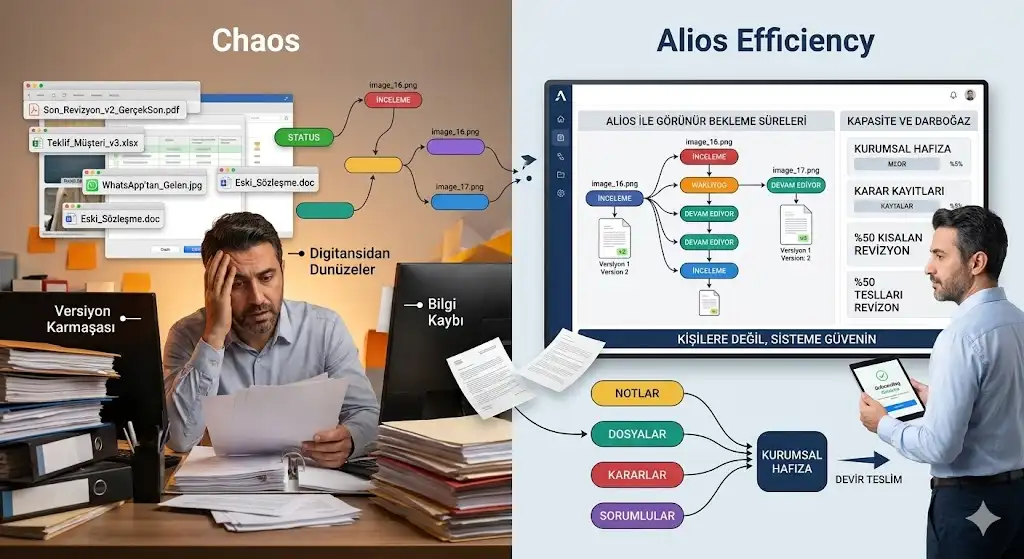
In the growth journey of an SME (Small and Medium-sized Enterprise), the most insidious obstacle is often not a lack of capital or market share, but the internal "digital noise." This noise is loudest in the realm of document management. We’ve all seen it: files named Final_Proposal_v2_Updated_REALLY_FINAL.pdf cluttering desktops, technical drawings shared in WhatsApp groups that vanish when needed three months later, and a "corporate memory" that effectively retires whenever a key employee leaves the company.
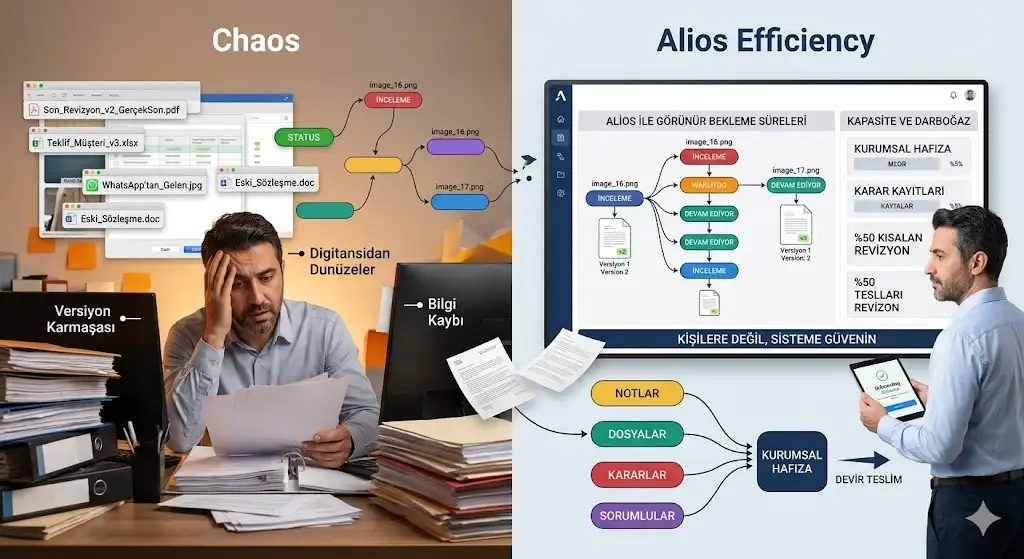
Document chaos is more than just an organizational nuisance. It is a significant cost factor that leads to production errors, incorrect pricing, and a loss of roughly 20% of employee productivity spent simply searching for the "right" file. Alios solves this crisis by moving away from deep, hollow folder hierarchies and integrating documents into the heart of the work: the Node (Unit of Work) structure.
1. Escaping the Folder Labyrinth: Node-Based Association
Traditional file management requires a mental map: Clients > 2026 Projects > ABC Corp > Designs > Archive... But in a fast-moving SME, work is rarely that linear.
Contextual Access: In Alios, a file is not an isolated piece of data. A contract isn't buried in a generic "Contracts" folder; it lives inside the "Legal Process" or "Sales Closing" Node associated with that specific client. You don't search for the file; you enter the work context, and the file is already there.
Smart Linking: When a document is uploaded to Alios, the system automatically understands its relationship to the project, the task, and the decisions made. This gives the document a "past" and a "future." Who uploaded it? Based on which decision was it updated? The answers are right next to the file.
2. Ending Version Chaos: Which One is the "Latest"?
The greatest operational risk for an SME is going into production with an outdated revision. The cost of manufacturing a part that is 2mm off because of an old drawing can wipe out an entire month's profit margin.
One Source, Infinite History: In Alios, file revisions are tracked within the Node History. The question "Which file was the latest?" becomes obsolete because the most current document always sits at the top of the Node.
The Error Barrier: While old versions are safely stored in the history (allowing for retroactive audits), only the active, approved version is prominently displayed in the workspace. This minimizes the chance of a team member accidentally processing an order based on obsolete data.
3. Protecting Corporate Memory from Personnel Turnover
In many SMEs, critical information resides in people's heads or on their personal laptops. When a key employee leaves, the technical details and historical files of their projects often leave with them.
Centralized Digital Spine: Alios aggregates all documents in a cloud-based, project-centric structure. Files are no longer trapped in email attachments or USB sticks.
Access & Permission Management: "Everyone sees everything" creates more chaos. Alios manages document access based on project roles. While the accounting team sees financial docs, the field team only accesses the technical specs they need. This ensures both security and focus.
4. Document Management Discipline: A Comparison
Problem AreaTraditional/Manual MethodAlios Digital Spine SolutionSearch TimeAverage 10–15 minutes2 seconds (Inside the relevant Node)Version ControlManual naming (v1, v2, Final)Automatic versioning and history logsInformation SecurityUncontrolled WhatsApp/Email sharingNode-based, authorized secure accessCorporate MemoryLost when staff leavesStays within the company's Digital Spine
5. Pro Tip: Setting up a "Document Checklist" in Alios
At the start of a new project, create empty Nodes for critical documents (e.g., Signed Contract, Technical Specs, Approved Design). As long as these Nodes are empty, Alios reminds you that the project is "incomplete." This is the fastest way to build a culture of standard operating procedures within your SME.
6. Conclusion: Let Your Files Work for You
Document management is not just a cleaning activity; it is a productivity strategy. By using Alios’s project-based structure, the information fog in your SME clears, replaced by a transparent, fast, and error-free operation. Having the right file in the right hands at the right time is what defines your business's professionalism and ultimate profitability.



