Article
Multi-Project Management: Agency Portfolio Visibility with Alios
Master the big picture. Learn how to use Alios project trees and status tracking to manage multiple projects, balance team workloads, and ensure total agency visibility.
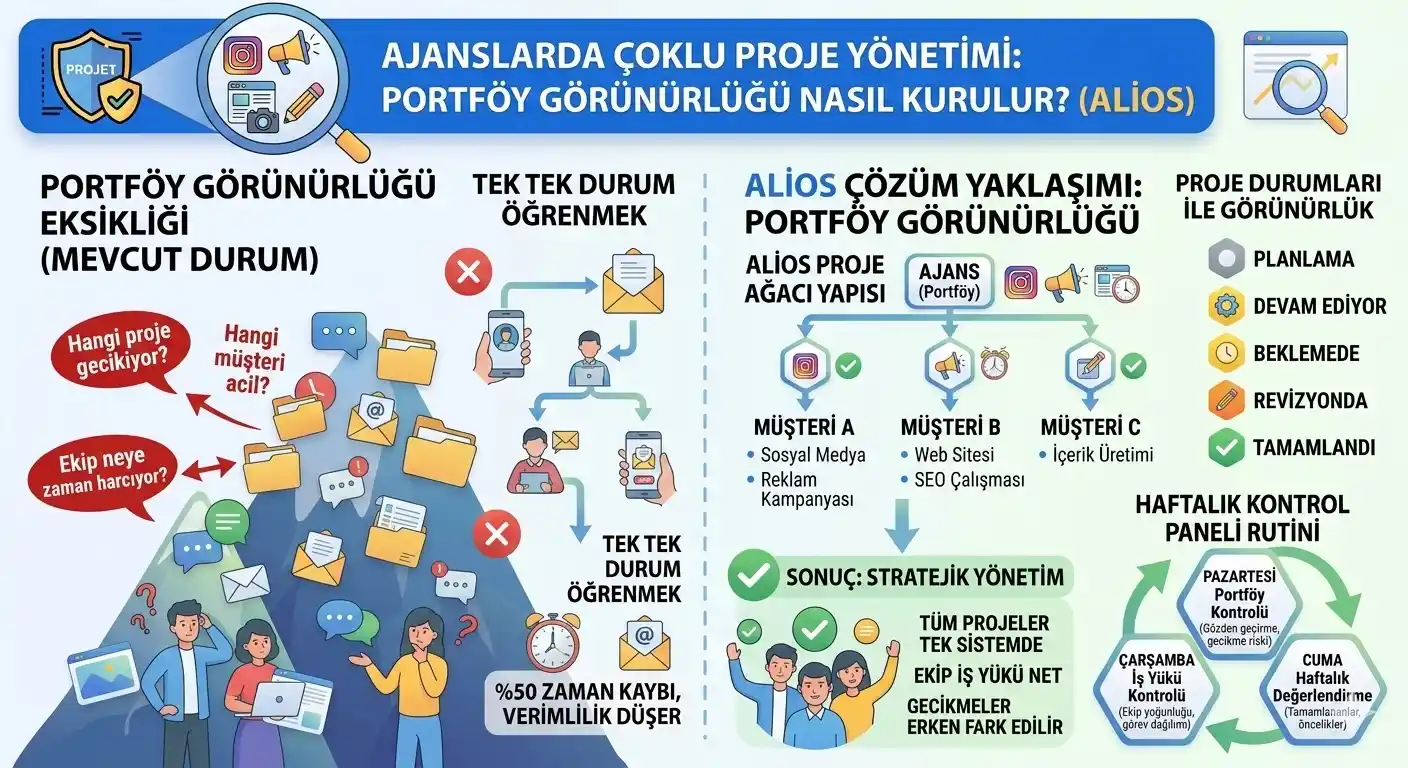
Multi-Project Management: How to Establish Portfolio Visibility in Agencies (Alios)
The operational structure of digital agencies often consists of a high volume of projects running simultaneously. As different processes such as social media management, advertising campaigns, and design are distributed within the team, tracking all tasks at once becomes a critical necessity for managers. If the answers to questions like "Which project is at risk of delay?" or "Which client is in the most urgent state?" cannot be seen in a single system, agency management becomes increasingly difficult. For this reason, successful agencies establish an approach called Portfolio Visibility to manage their operations more healthily.
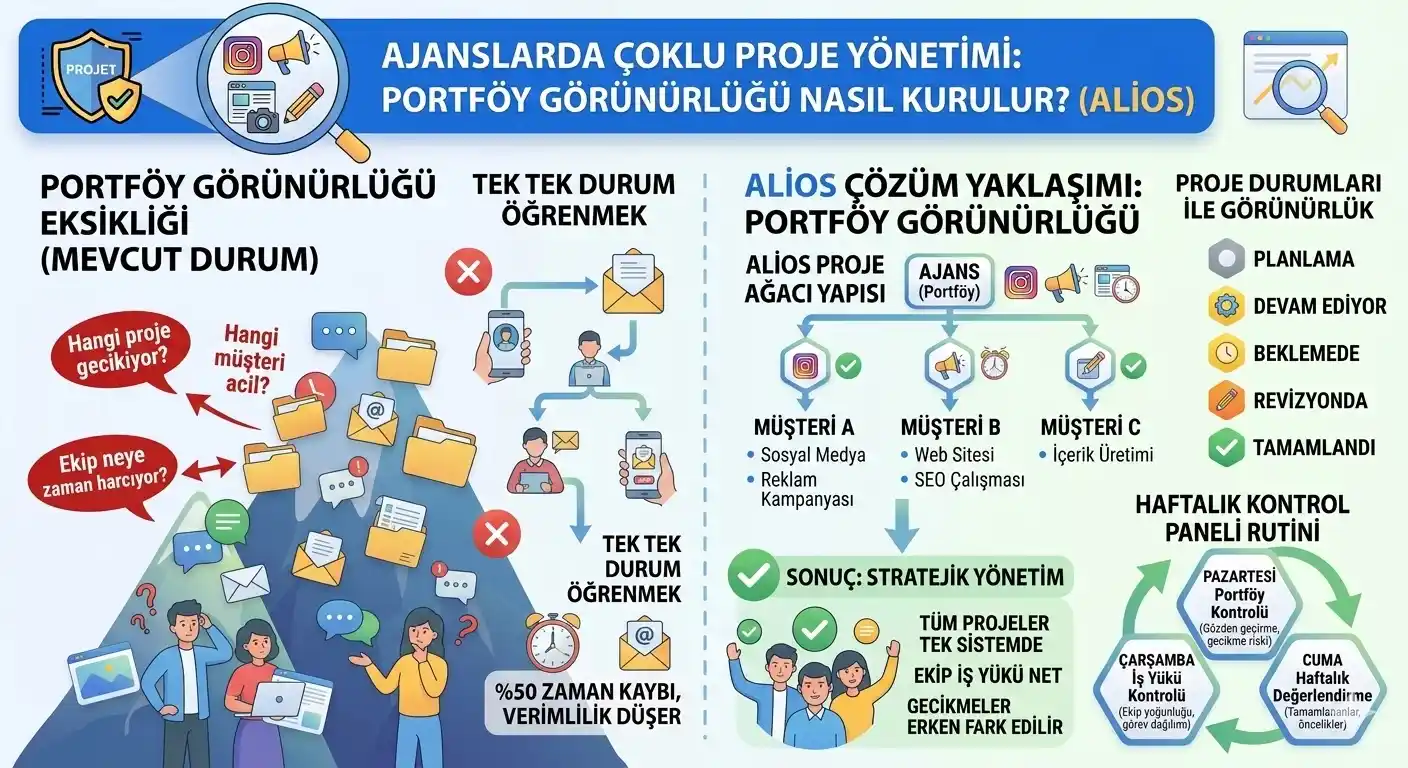
1. Why is Multi-Project Management So Difficult?
In agencies, the fact that projects are scattered across different tools and communication channels makes management arduous. When client requests remain trapped in emails or chat applications, the following structural problems arise:
Fragmentation of Tasks: Assignments are spread across various platforms (Slack, Trello, WhatsApp, Excel), making it impossible to see the "total load."
Individual Silos: Team members track work only through personal lists, leading to a lack of collective awareness.
Vanishing Requests: A significant portion of client demands gets lost within the noise of daily chats.
Scalability Walls: As the number of clients and tasks increases, it becomes unsustainable for managers to ask team members individually for project status updates. At this point, what agencies need is a system where they can see all projects at a single glance.
2. What is Portfolio Visibility?
Portfolio visibility is the ability to monitor all projects carried out within the agency on a single screen or system. This approach allows managers to quickly assess the big picture. A visibility dashboard typically includes information such as the project name, the responsible team member, current status, and upcoming deadlines. This way, with a single look, one can see exactly which projects the agency is focusing on and where the energy is being spent.
3. The Project Tree Structure in Alios
In Alios, portfolio visibility is primarily established through the Project Tree structure. This structure allows the agency to organize all work based on both clients and specific projects. Thanks to this hierarchy, managers can view operations at three distinct levels:
Client Level: See the total health of a specific account.
Project Level: Track the progress of a particular campaign or launch.
Node (Task) Level: Drill down into the specific status of individual deliverables.
4. Providing Visibility Through Project Statuses
One of the most critical components of portfolio visibility is the accurate definition of project statuses. Within Alios, projects are generally tracked using the following lifecycle:
StatusDefinitionManagerial ActionPlanningTasks in the initial stage.Resource allocation and briefing.In ProgressActive production process.Monitoring daily velocity.Waiting/RevisionProcesses awaiting client feedback.Follow-up with the client representative.CompletedJobs ready for archiving.Quality check and final billing.
Thanks to these statuses, managers can quickly distinguish between projects that are moving actively and those where a risk of delay might be emerging.
5. The Weekly Control Panel Routine
For visibility to be truly effective, a regular control routine must be established within the agency. Data is only useful if it is reviewed. A suggested weekly Alios routine includes:
Monday (Portfolio Audit): The current status of all projects is reviewed, and "at-risk" jobs are identified for the week ahead.
Wednesday (Workload Balancing): The task density of team members is examined; if one designer is overloaded while another is free, tasks are redistributed.
Friday (Weekly Review): Completed tasks are reviewed, successes are noted, and priorities for the following week are set in the system.
6. Strategic Advantages: Beyond Just "Tracking"
Establishing a visible portfolio with Alios isn't just about knowing what's happening; it's about making better business decisions:
Proactive Risk Management: Spotting a bottleneck on Tuesday means you won't have a crisis on Friday.
Accurate Forecasting: Knowing your team's real-time capacity allows you to tell a new prospect exactly when you can start their project.
Improved Client Trust: When a client calls, you don't need to "check with the team." You have the live status in front of you, building immediate professional credibility.
7. FAQ: Mastering the Big Picture
Q: Does having a "Project Tree" make the system too complex for small teams?
A: Actually, it simplifies things. Even for a two-person team, having a visual "tree" prevents the "what was I doing again?" moment. Alios scales its complexity based on how you build your nodes.
Q: How do we handle "Internal" projects versus "Client" projects?
A: Create a separate branch in your Project Tree for "Internal Ops." This ensures that agency marketing or internal improvements are visible alongside client work, preventing internal tasks from being ignored.
8. Conclusion: Strategic Agency Management
As agencies grow, the information clutter that usually accompanies expansion is mitigated through portfolio visibility. Consolidating all projects into a single system and having a clear view of the workload allows managers to make strategic decisions faster and with more confidence.
Thanks to Alios’s project tree and status management approach, teams can manage not just individual tasks, but their entire project portfolio in a more planned, transparent, and strategic manner. Stop managing through "status update meetings" and start managing through real-time visibility.



